Zero to your own blog: every step, the cost, and the part AI can't do.
- Learning chat: at least 3 to 4 hours per post. The title rounds that to 4.
- Prompts to get a site: 4.
- Deploy: about 3 minutes.
- Money: $0. A domain is optional.
Short on time? Copy the prompt at the end into your agent. It reads this post and walks you through every step.
No domain, no Vercel, new to GitHub? Start here
On a LinkedIn Live, I showed how I build my posts. At the end, Cladius Fernando, who hosted it, asked me to write it for someone with no domain, no Vercel account, and maybe new to GitHub. This is that post.
Why publish at all? If I spent 4 hours learning something in a chat, it shouldn't stay in a chat. My post on merging parallel PRs is one of those chats.
Setup costs nothing
I never timed the setup. Cladius's estimate on the Live was an hour or two for site, article and domain.
You need an agent, a program that reads your files, runs commands and edits code for you. I use OpenCode. Any agent works.
Open your terminal and install it:
curl -fsSL https://opencode.ai/install | bashCheck that all three tools answer with a version number. If node or git doesn't, ask any AI chat how to install it on your machine.
node -v
git --version
opencode --version
Run opencode in an empty folder. Ctrl+P opens the command palette, where you search for models and pick a free one. I used DeepSeek V4.1 Flash.
Check the free model before you pick it. Free models are free for a limited time, and some providers keep your data or train on it. Today GLM-5.3-Flash and DeepSeek V4.1 Flash both list zero retention. That page has the current list.
You may hit a rate limit. I did, on OpenCode, and finished the deploy in Claude Code.
Then make free accounts on GitHub, which stores your code, and Vercel, which puts it online.
Learn first. This is where the hours go
Pick something that confuses you and open a long chat with any AI. Mine run at least 3 to 4 hours. This part separates your post from slop, the generic writing AI produces when nobody questions it.
Don't accept a confident sentence. Copy my two questions:
- "Compared to what?" when it calls something efficient, better or wrong.
- "So what actually breaks?" when it names a problem and shows no failure.
Here is one real moment. A pool is a set of database connections that requests share. Press Go.
One process with one pool behaves the same in any language, so "very efficiently" had nothing behind it. "self claimly tagged" means it declared the label with no proof.
Keep going until the facts match what you can check.
Let your agent see the site it builds
My results came from the prompts plus one ability: my agent could look at the site.
The browser-use skill, a set of instructions and tools the agent can load, lets it open the site, look at it, resize for mobile, fix what broke and repeat. Claude Code has a Chrome option that does a similar job.
Without it, the agent can't notice a broken layout. Then you do that part: open the site, and tell it what looks wrong or paste a screenshot.
Warning: this gives the agent your signed-in browser, so it can act as you. For example, it could send a message from your logged-in LinkedIn. Use a separate browser profile at first.
Four prompts turn the chat into a site
Open your chat's share button and copy the link. Anyone with a ChatGPT share link can view that chat, no account needed. Check it for private details first, and delete it later in Settings, Data controls, Shared links.
These are my real prompts, typos included. Swap the parts in <angle brackets>. Give it links rather than typing everything out. Agents read links and files. To skip typing altogether, speak: Wispr Flow and Hex turn speech into text.
1. Hand it the chat. A TOC is a table of contents, so you approve the shape before it writes anything.
ref chat: <link to your chat>

Refer to this chat where we discussed topics related to <your topic> and what not.

Goal: To draft a comprehensive blog, which distills all the knowledge and concepts we tried to unravel in this long chat. Especially the pushbacks, confusions and the final verified facts.

Steps:
- draft a high level TOC for the blog
- create the blog after my approval

#NOTES:
- refer my side of the chat inputs for ref to how i like to talk and infer my speaking style
- keep it pragmatic, clean and concise
- only use simple language (no jargons)
2. Answer its questions, get a site. It asked me about length and code. Answer briefly and move on.
1. tight
2. just ts code snippets where helpful

Just get a portfolio site w/ blog section create now.

Try to learn about me from here: <your LinkedIn URL>
3. Look at it. Read the first cut yourself before adding anything.
open up the site for me4. Make it playable. Point it at writing you admire, and say what each animation is for. A worktree is a second folder with its own branch, so the first version stays untouched.
ok this looks good.

cud u create me another version of the site with some small update on the blog writing
- i want you to add some interactive elements/animations to make the reading experience more immersive
- ref to blogs made by sam: https://samwho.dev/
- each animation should help get a visual view of the concept being talked about - and making the content/concept become even more simple to understand

have this live on another worktree
Put the example right beside the concept
The idea comes from Sam Rose. The load balancing post lets you watch each strategy work or fail, so you don't have to picture it yourself. It unlocked something for me.
This one is from my PRs post. Ben and Maria are AI agents building a made-up mail app. Ben's #3, a pull request asking to add its code to main, calls a function that only Maria's #2 has. Press Go.
A paragraph would make you hold that in your head. Here you watch it fail, move and pass.
Stop here and you have a site, not a post
This is what those prompts gave me, untouched: the first output from DeepSeek V4.1 Flash, with its post "The bug Redis didn't cause". I didn't check its wording, so don't treat it as fact.
The finished post from the same chat is I Asked What Durable Objects Are.
| First output, untouched | Finished post, same chat |
|---|---|
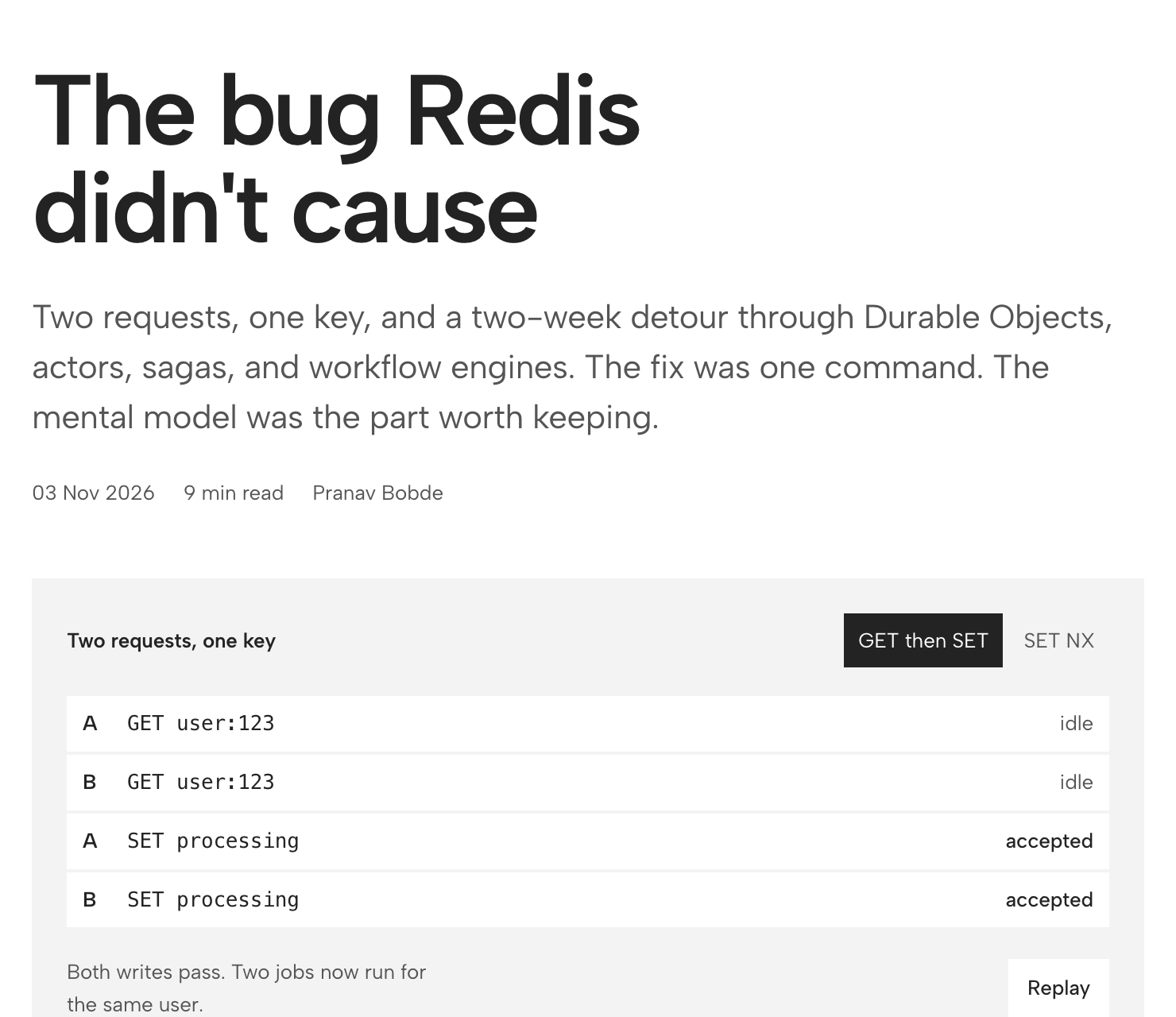 | 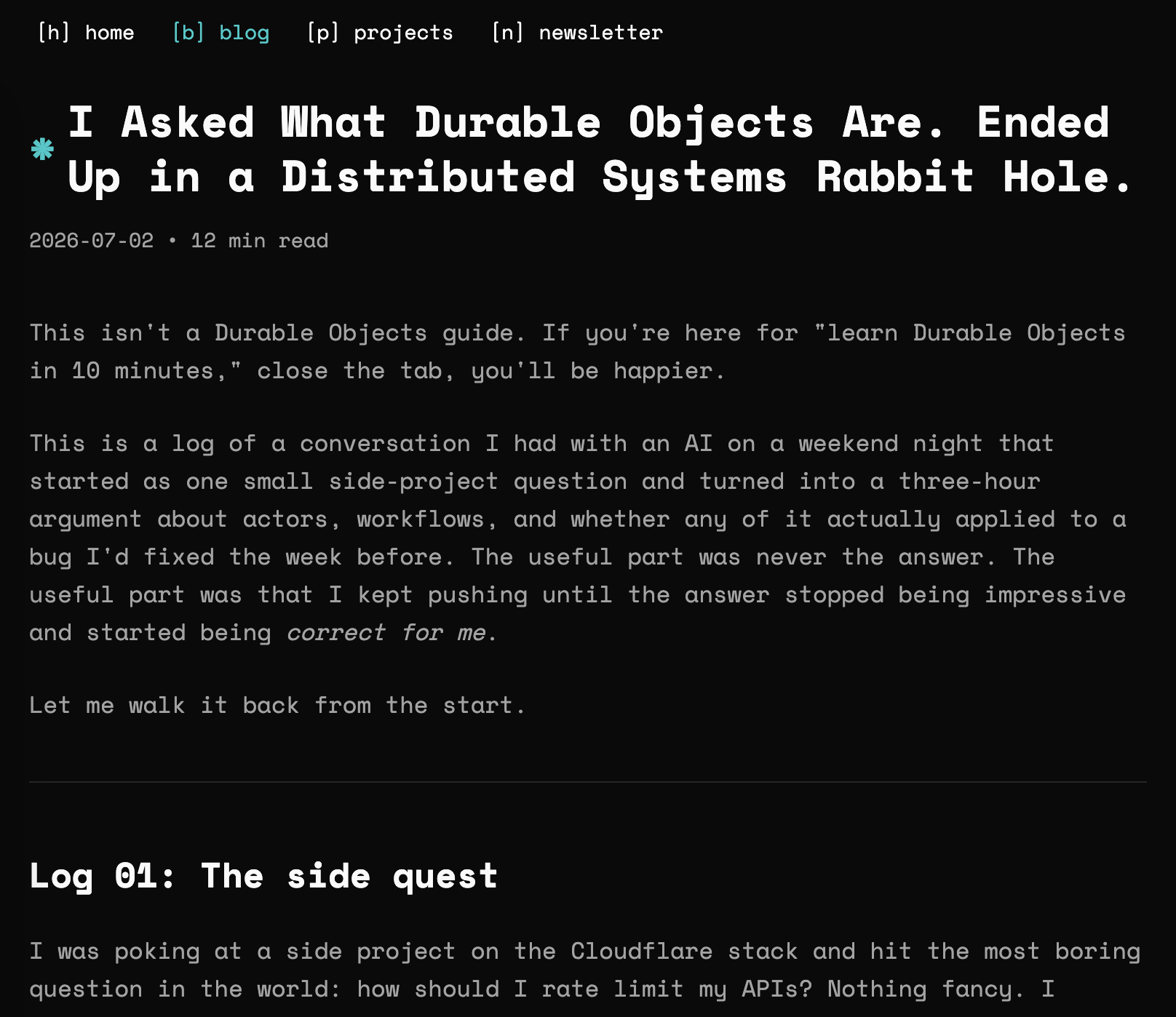 |
Four prompts get you the left one. The right one comes from your back and forth: the UI you change, the wording you reject, the claim you refuse.
Going live is one prompt, and the free link is enough
Install the GitHub CLI and Vercel CLI, command-line tools your agent can drive. Then log in once on each. This is what lets the agent deploy for you.
gh auth login
vercel login
Now ask. Mine took about 3 minutes.
can you please create a GitHub repo and deploy and connect it to Vercel and then just give me the links- Make the repo private unless you want it public.
- Never put keys, the passwords your code uses to reach other services, in the code.
You can stop here. The free Vercel link is a real public site. Cloudflare's free tier also works.
Want your own domain? DNS is the internet's phone book, and a registrar is the shop that sells you the name. I use Spaceship.
- Buy the name at your registrar.
- In your Vercel project, open Domains and add it.
- Copy the record Vercel shows you.
- Paste it in your registrar's DNS settings.
- Wait. Often minutes, allow 30.
Vercel handles SSL, the padlock on https. A subdomain like blog.yourname.xyz uses a CNAME record and a root domain like yourname.xyz uses an A record. Always copy what Vercel shows.
Here is what that record does:
What a domain costs:
- Personal-name
.xyz: about $2.19 for the first year when I checked on the Live. Trackers show it renewing at about $10 to $13. - Cladius's domain: about $15 for a year.
.ai: much more.
Check the price at checkout, renewal included.
Hand this post to your agent
Copy this into your agent: OpenCode, Claude Code, Codex or any other. It reads this post, then walks you through it one step at a time.
Read this post first: https://pranavb.xyz/blogs/first-blog

Guide me from zero to my own blog post, live on the internet, following that post.

How to guide me:
- One step at a time. Say what the step does, then wait for me before the next one.
- I may be new to the terminal, GitHub and Vercel. Explain each new term in one plain sentence.
- Run commands for me when you can. Tell me exactly what I must type or click myself.
- Ask me before anything that costs money, makes something public, or can't be undone.
- Never put keys or passwords in the code.

Steps:
1. Check that node, git, the GitHub CLI and the Vercel CLI are installed. Help me install what's missing.
2. Ask what I want to write about and for my learning chat's share link. Remind me to check that chat for private details first. If I have no chat yet, explain the post's "Learn first" section and stop until I have one.
3. Draft a table of contents from the chat and wait for my approval.
4. Build a simple portfolio site with a blog section and write the post. Learn about me from my LinkedIn URL. Keep my voice and simple words.
5. Open the site for me. If you can view web pages, check it at desktop and phone widths and fix what breaks.
6. Add small interactive examples beside the hard ideas, like https://samwho.dev/ does.
7. Create a private GitHub repo, deploy it to Vercel, and give me both links.
8. Ask if I want my own domain. If yes, walk me through adding it in Vercel and in my registrar's DNS settings. I buy the domain myself.
The agent can build the site. The learning chat is still yours. When the AI calls something better, efficient or wrong, ask what it compares against and what actually breaks.
If the AI changes its answer when you question it, the first answer was never proof.
Use any tool you like. Just never skip the checking and the pushback.