Enterprises are out here burning real money on AI tokens while the rest of us are chilling on heavily subsidized plans. That gap is funny until you're the one paying API prices - and then it's just your cloud bill wearing a new hat.
This post is about how enterprises can keep that bill sane. Not "use the cheap model." Something more useful: understand where the money leaks, then stop the leaks. Let me walk through how token pricing really works, and then the handful of tricks teams can lean on.
The subsidy nobody tells you about
First, some context on why your bill probably feels fine right now.
If you're an individual dev or a small startup, you're almost certainly on a subscription - Claude Code, ChatGPT, whatever. Those subscriptions are subsidized to a degree that's genuinely hard to believe. Enterprises wiring up the raw API pay the actual per-token price. You don't.
SemiAnalysis did the math on OpenAI and Anthropic's Claude plans, and the numbers are wild. The Anthropic/Claude plan math is the roughly 40x example. On the OpenAI side, it worked out to something like $200 for around $14,000 of inference value - close to a 70x ROI.
So if you've ever wondered how you're getting away with hammering Claude Code all day for a flat monthly fee - that's how. You're not paying what it costs. Someone upstream is eating the difference to buy market share.
That's great for us. It also means the instincts you build on a subsidized plan don't transfer the moment you touch the real API - for a side project, a client, or your own product. The second you're paying API prices, every one of the tricks below starts mattering.
Enterprises already feel it. Fortune reported Uber burned through its 2026 AI budget in four months. Business Insider covered the "tokenmaxxing" shock CFOs may face. WSJ wrote about companies managing AI token spend. And Anthropic's own Claude Enterprise consumption guide says Claude Code and Cowork sessions can be significantly more token-intensive than normal chat.
Tokens are the new cloud bill.
So how do teams actually paying the bill keep it down? Start with how the bill is even calculated.
How token pricing actually works
Most people picture pricing as one number: cents per million tokens, done. It's not one number.
Look at OpenAI's pricing docs and you'll see at least four things going on:
- Input tokens - your prompt, your context, everything you send in.
- Cached input tokens - repeated context that's been cached, billed much cheaper. This is why stable, reused prompts are your friend.
- Output tokens - what the model writes back.
- Reasoning tokens - and this is the sneaky one.
Output is where it hurts, and reasoning is why. OpenAI is explicit that output pricing includes both the visible output and the reasoning tokens - even though reasoning tokens never show up through the API. You never see them. You still pay for every one.
So when you ask a model a question, you think you paid for your prompt plus the answer. Behind the scenes it may have generated a pile of reasoning tokens, made a few tool calls, read the results back in, and then carried all of that forward as context for the next step.
Here's the example that makes it click. Say I ask:
> Who's smarter, Elon or Sam?
The model might search, pull some facts, reason internally, then answer. Now I follow up:
> Okay, now compare him with Einstein.
The model doesn't just see that one sentence. It carries the whole previous turn - my first question, the tool results, the reasoning path - all of it back into context. Every turn drags the last turn along with it.
That's the whole reason agentic workflows get expensive. Each step makes the next step heavier. Input grows, reasoning stacks up, tool results pile in, and the counter keeps ticking on tokens you never actually see in the chat.
Once you internalize that, the naive "just pick the cheap model" move starts to look shaky.
The cheap-model trap
Picture the classic setup: your PM says "use AI, but keep the model cost low."
Natural instinct - open a pricing table, sort by price, grab something like Gemini Flash because on paper it's a fraction of the cost of the top OpenAI or Claude models. Cheap model, cheaper bill, right?
Not always. Sometimes not even close.
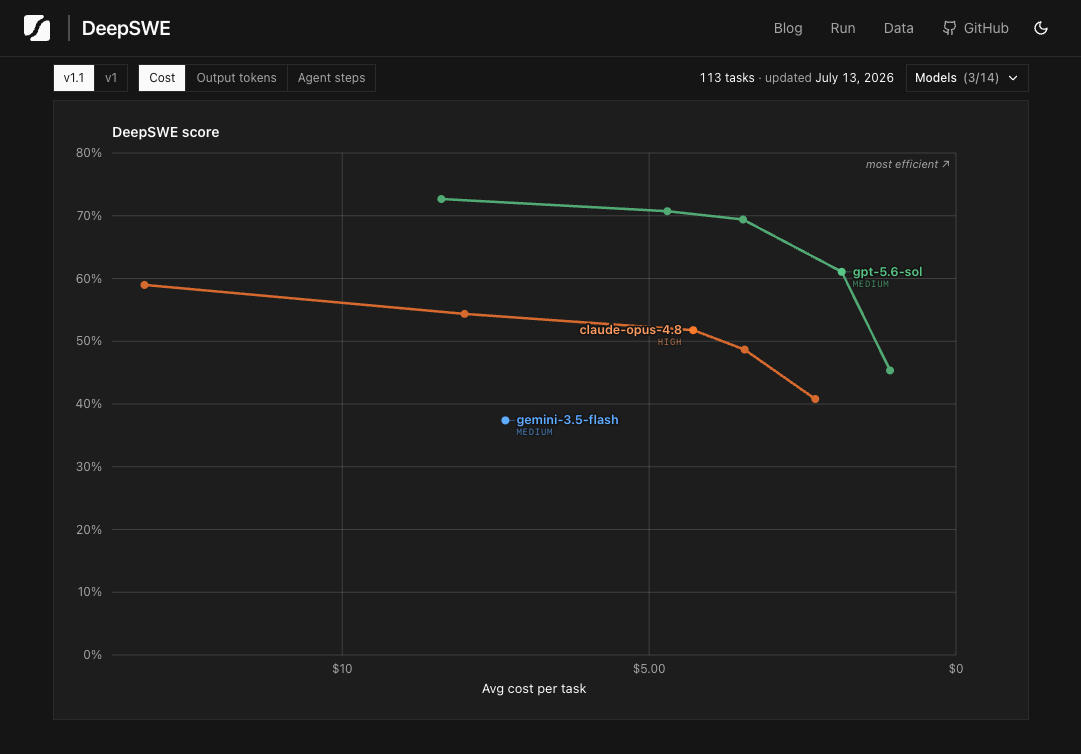
This is where a benchmark like DeepSWE earns its keep. Instead of only staring at the sticker price, it looks at how many output tokens a model burns per task, how many agent steps it takes, and how much quality you actually get out the other end.
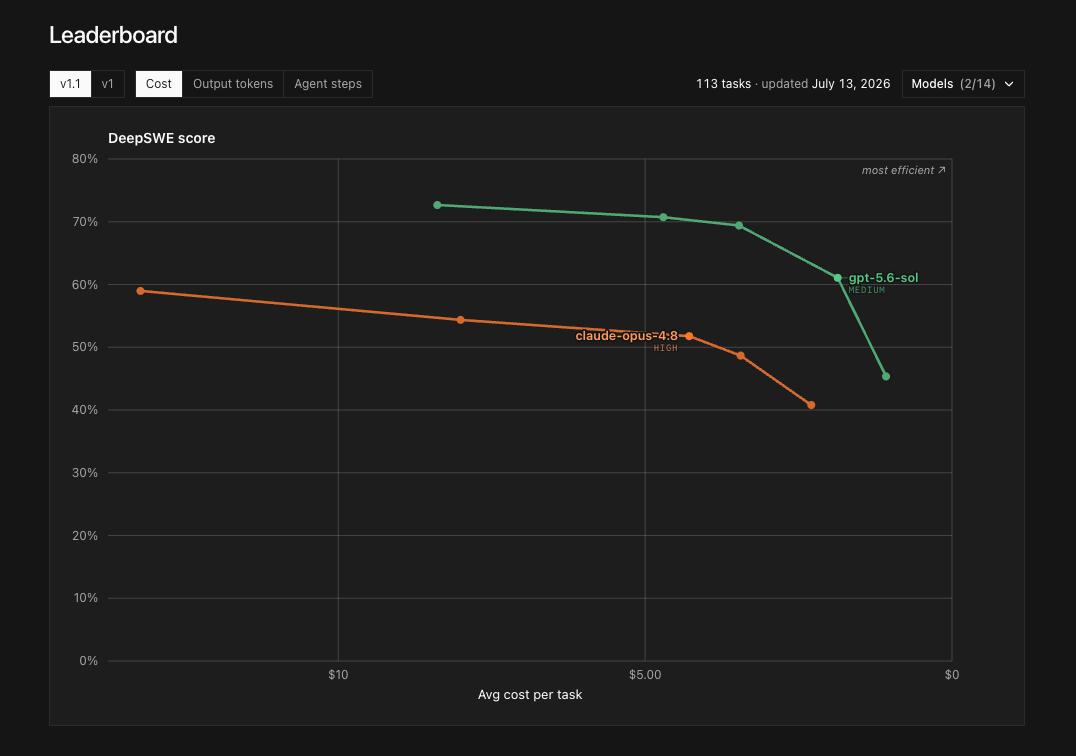
First look at the cost view. Gemini does not look scary if you only stare at the dollar axis.
| Cost view: Gemini included | Cost view: Gemini removed |
|---|---|
 |  |
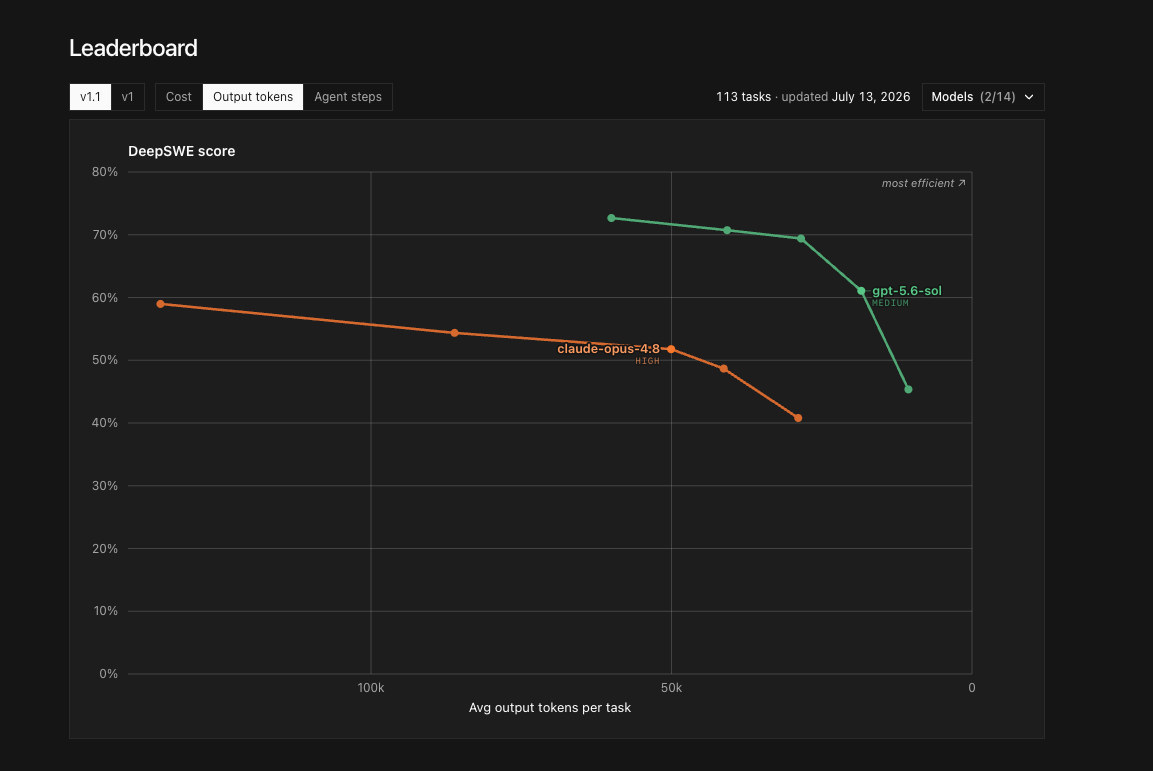
Now switch the same comparison to output tokens. This is where the trap becomes obvious.
| Output tokens: Gemini included | Output tokens: Gemini removed |
|---|---|
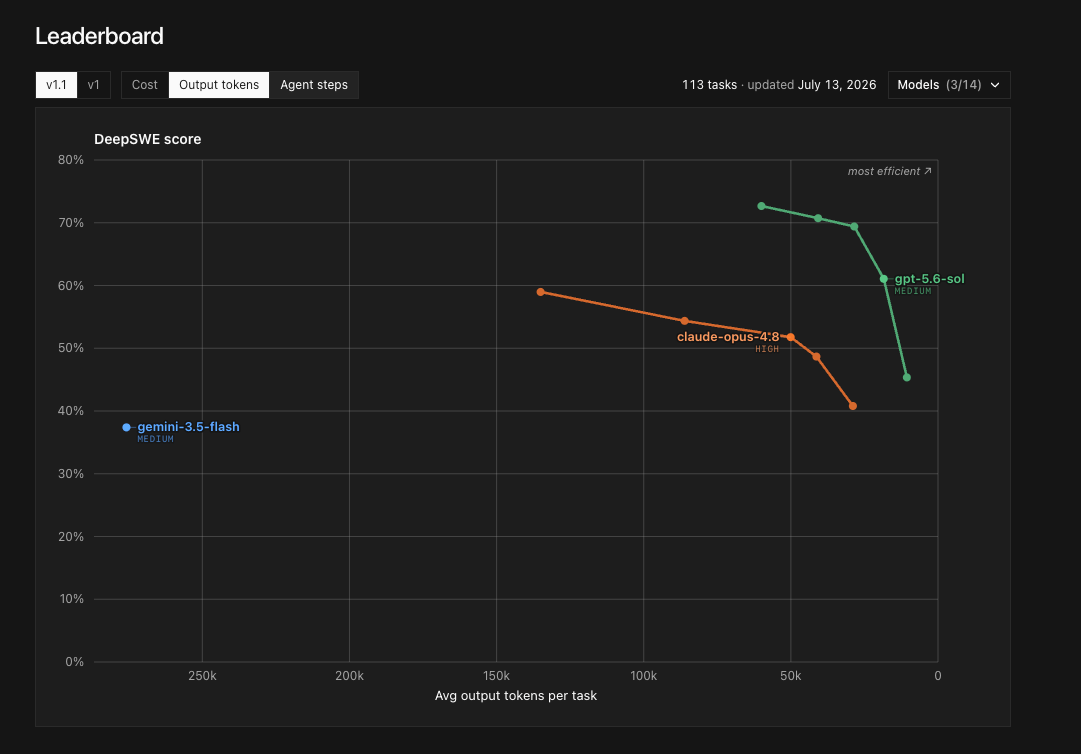 |  |
If you trusted the pricing page, you'd expect Gemini Flash parked comfortably in the efficient corner - low output, decent score, low cost. But on the DeepSWE output-token chart, Gemini Flash sits far from the efficient frontier. It spews a huge number of output tokens per task while scoring well below the top OpenAI and Anthropic models. It's cheap per token and expensive per result, because it rambles, loops, and retries its way to a worse answer.
So the point is dead simple:
> Lower model pricing does not automatically mean lower AI cost.
The number that matters isn't price per token. It's price per successful task - tokens times price, times loops, times your retry rate. A model with a higher sticker price that finishes cleanly in one pass can easily beat a "cheap" model that flails through five. Optimize the finished task, not the rate card.
Okay - so how do you actually push that number down? Four things I do.
Tip 1: Compress the output
Output and reasoning tokens are where a lot of the money leaks, so the obvious move is to make the model say the same thing in fewer words.
Simplest version I recommend: the Caveman skill. Sounds like a joke, works like a charm. It makes the model talk with fewer words while keeping the meaning - less fluff, less polite padding, no three-paragraph preamble before it answers the actual question.
And this is not only a meme. People have shared OpenAI reasoning-token leak examples, and even if you should not treat random screenshots as official docs, the pattern is hard to ignore. OpenAI is one of the top labs in the market, and those snippets look extremely compressed: short fragments, dense wording, maximum meaning per token. It looks like top labs are already doing something similar behind the scenes to keep reasoning traces compact. Caveman-style output is just applying that same compression instinct to the visible answer.
Even if you never install the exact skill, steal the idea. Build your own concise-response mode. Bake it into your agents. Make them stop writing essays when all you needed was a decision.
Tip 2: Use Claude as the orchestrator, not the workhorse
This one's mostly for people on Claude Code CLI subscriptions.
Claude has a well-earned reputation for the five-hour limit evaporating the moment you actually try to get real work done. It's gotten better, but next to some of the roomier OpenAI-style plans it can still feel tight. So don't hand Claude every heavy-lifting task directly.
Use Claude for what it's genuinely great at: planning, reviewing, managing, provisioning, orchestrating. The senior-engineer stuff - judgment and taste. Then route the heavy, mechanical, repetitive work to cheaper and more efficient models like GLM or the OpenAI models, depending on what you've got access to.
Keep Claude as the manager. Let the cheaper workers grind through the bulk. You're spending your expensive taste where it compounds and your cheap tokens where they don't.
Tip 3: Don't default to Ultracode / extra-high effort
Related side tip: stop making extra-high effort and Ultracode-style modes your default.
I'm not saying never touch them. A massive codebase migration or a genuinely gnarly multi-agent task? Sure, that's what they're for. But for normal everyday work - single-file edits, quick questions, small bug fixes, mid-run interactive stuff - cranking effort to the max mostly adds latency and cost without adding quality. It turns into expensive exploration instead of a better answer. (Here's a decent writeup on Claude Code Ultracode if you want the details.)
For most work, Opus or Fable at high effort is the better default. Start lower, and turn the dial up only when you can actually see the quality improve.
Tip 4: Send context as an image when it makes sense
This one's more of a sharp edge than an everyday habit, but it's worth knowing.
Text tokens and image tokens get counted differently. So in some cases, shipping dense context as an image can be cheaper than sending the same thing as raw text. Ariel Profisea has a good breakdown of the image-context idea, and there's a project called pxpipe that does exactly this - it renders text context into images and sends those to the model to cut token usage.
Big caveat, and I mean big: this is workload-dependent. Do not do it for exact IDs, hashes, secrets, or anything that has to be byte-perfect - OCR-ish reading of an image is not the place to bet your data integrity. But for dense old context, long logs, tool-result dumps, or history where the model only needs the gist, it can save a real chunk.
Their results also underline the theme of this whole post: model choice matters even here. Fable 5 is noticeably better at reading these dense image contexts than the other models they tested. So once again - the cheapest-looking model is not always the cheapest workflow.
A timing note (this one has an expiry)
Quick, date-sensitive aside - by the time you read this it may already be stale: Fable 5 access got extended through July 19 for paid plans.
If you're already on a plan, or you've been meaning to test Fable before it drifts toward more API-style pricing, this is the window. Just don't expect the cheap access to hang around - these models chew through limits fast if you actually push real coding work at them. And when you do test it, use it like a senior reviewer and orchestrator, not a model you throw every one-line edit at. Same principle as Tip 2.
The actual takeaway
Put it all together and the mindset shift is the whole game. Stop asking:
> Which model is cheapest?
Start asking:
> Which workflow finishes this correctly with the fewest total tokens, retries, and human fixes?
Everything else falls out of that. Understand what you're actually billed for - input, cached input, output, and the reasoning tokens you never see. Don't trust pricing pages blindly. Compress your output. Spend expensive judgment where it compounds and cheap tokens on the grunt work. Skip Ultracode by default. Reach for image context when the workload allows it.
txt
Real cost = tokens x price x loops x retry rate
Optimize cost per finished task, not price per token.
The goal was never to be cheap. The goal is to stop paying premium prices for confused loops.